

Do you use Adobe for image editing?
I get asked this a lot, especially since people know about my situation with Adobe. And the answer might surprise you — not because it’s complicated, but because it’s simple.
I haven’t used Adobe Photoshop or Lightroom in years - and I’m better for it. My images are still being used in ads. And I’m spending less money.
Here’s what I actually use and why.
Capture One
For my main editing, I use Capture One.
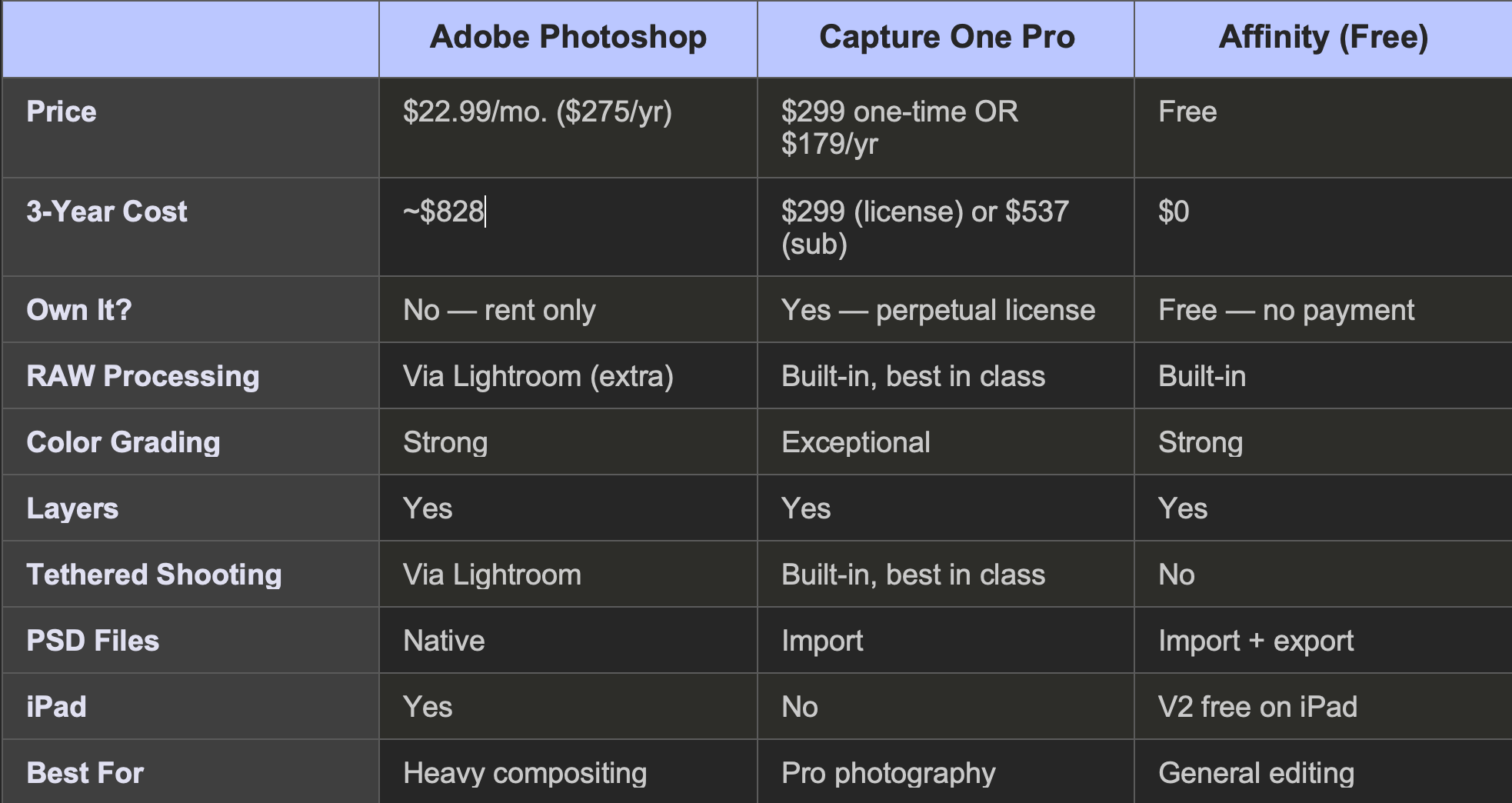
There are a few reasons. First, the features — it has more than enough packed in it. RAW processing, color grading, tethered shooting, layer-based adjustments. Everything I need for professional work is there. I’m not missing anything from Photoshop or Lightroom.
Second, and this is the big one for me — they offer a one-off license. You can buy it once and own it. No subscription required. Now, if you want the latest updates, the subscription is still available. But you have the choice. That word matters. Adobe took choice away from creators a long time ago. Capture One still gives it to you.
The perpetual license is around $299. The subscription runs about $179 a year if you go that route. Either way, you’re looking at less than what Adobe charges for the Photography plan over the same period — and you actually own something at the end of it.
For me personally, I have everything I need with the license I have. I’m not chasing updates. I’m focused on the work.
Affinity Photo
I do like Affinity Photo on iPad. It’s a solid editor and it feels natural on the tablet for quick work.
Now, Canva acquired the company behind Affinity, and the new version is completely free. The core editing tools — photo editing, graphic design, page layout — all free. The only paid add-ons are AI features that require a Canva premium plan.
So if you’re someone who’s been on Photoshop purely because you didn’t want to pay for another app, that reason doesn’t exist anymore. It supports layers, masks, adjustment layers, RAW development, and it can open PSD files. It’s worth checking out again.
I’ll be transparent — Canva is a tech company with its own AI ambitions; I’ll share my experiences with them in a future post. But using Affinity doesn’t require you to upload content to a stock marketplace that feeds an AI training pipeline. That’s a meaningful difference from the Adobe ecosystem.
The Biggest Secret
But honestly, the real answer to “what replaced Photoshop for you” isn’t another app. It’s how I shoot.
I focus on getting my images perfect in-camera so that no edits are needed.
Lighting. Composition. Exposure. White balance. If you put the time in before you press the shutter, the image is done when it comes out of the camera. I’m not spending hours in post. I’m not color correcting things that should have been lit correctly. I’m not cropping because I should have moved three feet to the left.
I see my images used for ads all the time. And guess what — there were no edits. Straight out of camera. That’s not a brag. That’s the result of putting the work in before the capture, not after.
The photography software industry has conditioned people to think that editing is where the magic happens. And for some types of work, it is. But for a lot of photographers, heavy editing is a fix for not getting it right in the first place. I’d rather invest that time at the point of creation.
And when your editing needs are minimal, your software needs are minimal. That changes everything.
The Side-by-Side
For people who want the numbers, here’s how they compare.
Why This Matters Beyond the Software
If you’ve been following me, you know the bigger picture. Adobe used nearly 12,000 of my images to train their AI without my consent. They argued vague contract language gave them the right. They offered 42 cents per image to settle.
So instead of funding a company that is taking creator content without consent, there are practical options for switching. And it’s better on your bank account.
That’s really what this comes down to. You have options. They’re good options. Some of them are free. And every dollar you redirect away from Adobe is a dollar that isn’t funding the system that exploits creators.
You don’t have to do it all at once. Download Affinity this week. It’s free. Open one of your projects in it and see how it feels. If you’re a professional photographer, try the Capture One trial on a real shoot. And on your next session, challenge yourself to get images that need zero editing. Focus on the light. Focus on the composition. See what happens.
The tools are there. The information is here.


